For UK players considering Mostbet on a phone, the first practical questions are whether the service works on their device, how to reach help and what happens if an installation or account issue arises. This mostbet casino customer support review looks at the mobile setup process and the support options a user should check before depositing. It is informational, not an endorsement: availability, terms and licensing can change, so confirm the current position with the operator and the relevant UK authorities before using any gambling service.
Check availability before installing
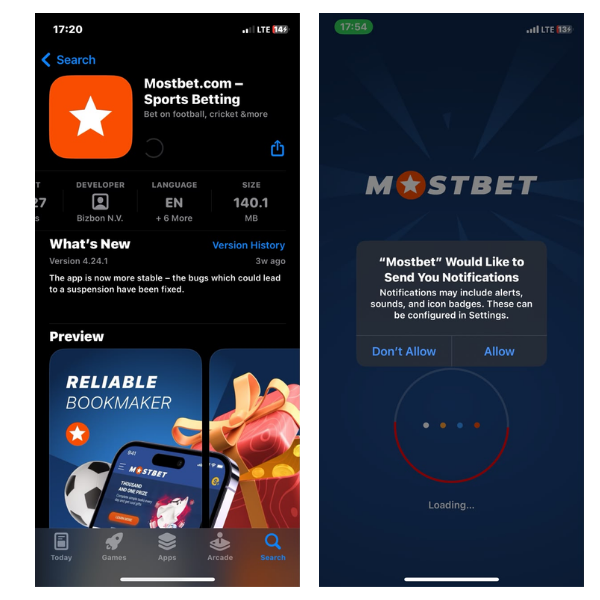
Mostbet may offer an Android APK and mobile access through a browser, while iPhone users may have a different installation route or use the website. An APK is an Android application package installed outside the Google Play Store. That can be convenient, but it also means users need to take extra care to verify the download source and the app’s permissions.
Crucially, an app being downloadable does not establish that the operator is authorised to provide gambling services in Great Britain. UK players should check the UK Gambling Commission’s public register for the exact operating company and domain. If the operator is not appropriately licensed for Great Britain, do not assume that a working website or app makes play lawful or protected under UK rules. People in Northern Ireland should check the rules applicable to their location as well.
Android APK setup: a cautious approach
- Confirm eligibility. Read the operator’s terms and check whether residents of your country are accepted. Do not use a VPN or false details to bypass geographic restrictions.
- Find the official source. Follow the download link from the operator’s verified website, reached by typing the address yourself or using a trusted bookmark. Avoid APK mirror sites, social-media links and files sent by strangers.
- Review the file and permissions. Check the app name, publisher information and requested access. A casino app should not need unrelated access such as contacts or text messages to provide basic play.
- Install only if satisfied. Android may ask you to permit installation from that particular source. Allow it only if you have verified the source, and turn the setting off again afterwards.
- Secure your account. Use a unique password, enable any available additional verification and avoid signing in on shared devices or public Wi-Fi.
Menu names vary by Android version, so consult your device manufacturer’s instructions if you cannot find the installation setting. Keep Android and security software updated. If a file triggers a warning, the link redirects unexpectedly or the publisher is unclear, stop rather than trying to override the warning.
Browser use and iPhone options
A mobile website can be a simpler alternative to installing an APK. Open the verified operator site in an up-to-date browser, check that the address is correct and use a secure connection. A padlock icon indicates an encrypted connection, but it does not prove that a gambling business is licensed or trustworthy.
For iPhone, use an official App Store listing if one is available in your region, or access the service through the mobile browser. Do not follow instructions to install unfamiliar configuration profiles or enterprise certificates merely to obtain a gambling app. These methods can grant broad control or compromise device security. If the operator’s app is unavailable through a recognised route, ask support to confirm the legitimate option rather than relying on a third-party download.
Support channels and what to ask
Customer support can help with technical access and account questions, but it cannot make an unlicensed service suitable for UK residents. Before registering, find the help or contact section and check which channels are actually offered, their stated hours, and whether they provide assistance in English. Depending on the current service, options may include live chat, email or a contact form. Do not assume a phone line or round-the-clock coverage exists unless the operator confirms it.
Useful questions before you deposit
- Is this specific app or website available to players at my UK address, and which legal entity operates it?
- Where can I read the applicable UK terms, privacy notice and complaints procedure?
- What documents may be requested for identity and age checks, and how should they be submitted securely?
- Which payment and withdrawal methods are available to UK customers, and what fees, limits or processing times apply?
- How can I set deposit limits, take a time-out, close my account or request self-exclusion?
- How do I report an app-security concern or a suspicious account login?
Share only information needed to resolve the issue. Never send a password, one-time passcode, full card security code or cryptocurrency recovery phrase to someone claiming to be support. If identity documents are required, use the account’s verified secure upload process, not an email address supplied in an unsolicited message.
Common setup problems
The APK will not install
Check that the phone’s Android version is compatible and that there is enough storage. A partially downloaded or outdated file may fail, so return to the verified source and check for current instructions. Do not disable device protections broadly or install a modified version from another site. If the official file still fails, send support the device model, Android version and exact error message—without including sensitive account credentials.
The app opens but login fails
First check the username, password and network connection. Use the official password-reset process if needed, and beware of search advertisements or messages that lead to lookalike login pages. If an account is locked, contact support through the contact details shown on the verified site. Ask for a case reference and keep a record of relevant dates and replies.
A payment or withdrawal is delayed
Review the cashier’s published conditions, transaction status and any requested verification steps. Processing times can depend on the method and checks, so an immediate credit or payout should not be assumed. Contact support with the transaction reference and amount, but do not send payment details through an unverified chat or public forum. If a dispute is not resolved, follow the operator’s formal complaints process and check whether an independent dispute-resolution route applies to the operator and your location.
Mobile safety and responsible play
Convenient phone access can make gambling easier to fit into spare moments, but it can also make it harder to notice time and spending. Set a firm budget before playing and use only money you can afford to lose. Explore deposit, loss and session limits where available; these tools do not guarantee that gambling will remain safe, so take a break or stop if play is causing stress or financial difficulty.
Do not gamble while driving, working or caring for someone, and avoid playing when affected by alcohol or medication. UK residents can find confidential information and support through organisations such as GamCare and NHS services. If you choose self-exclusion or account closure, check the operator’s process and seek help if the controls are difficult to use.
Questions and answers
Is an APK safe just because it is linked from a casino website?
No. A link from a verified site is safer than an unknown mirror, but it does not guarantee that a file is secure or that the operator is licensed. Verify the domain, inspect permissions, keep your device updated and stop if anything appears unusual;
Can UK players use the app?
That depends on the operator’s authorisation, the player’s location and the current terms. Check the UK Gambling Commission register and the operator’s legal information before creating an account. Do not use technical workarounds to get around location restrictions.
What details should I include when contacting support?
Provide a concise description, the device and app version, the approximate time of the problem and any non-sensitive error text. For payment questions, include the transaction reference where appropriate. Never include your password or one-time verification code.
Bottom line
Mostbet mobile access may be straightforward when the correct route is available, but installation convenience is only one part of the decision. UK users should first verify legal availability, then obtain any Android APK from a trusted official source or use a recognised browser option. Read the terms, test support with basic questions before depositing, protect personal information and use responsible-gambling controls. If licensing, download authenticity or withdrawal conditions cannot be verified, the prudent choice is not to install or play.